
Free Google Sheets template
Stripe Commission & Revenue Share Tracker for Google Sheets
Calculate rep commissions and partner revenue share from Stripe data. Set owner rates, choose a gross or net base, and review payouts by month.
- Free to use with CSV exports
- Editable formulas and rates
- No SyncStaq subscription required
Inside the actual template
From Stripe rows to a payout summary.
Map customers to reps or partners, apply their rates, and trace each commission back to its charge. Here are three views from the workbook.
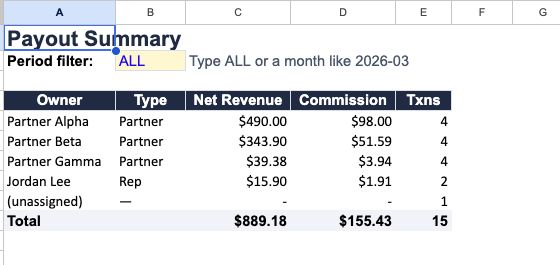
Review commission totals by owner for all periods or a selected month. The sample workbook shows $155.43 in total commissions.
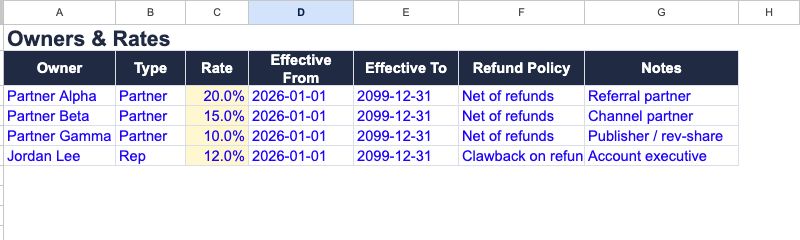
Enter your owners and their rates. The current calculation uses one lookup rate per owner; effective dates and refund-policy labels are not applied automatically.
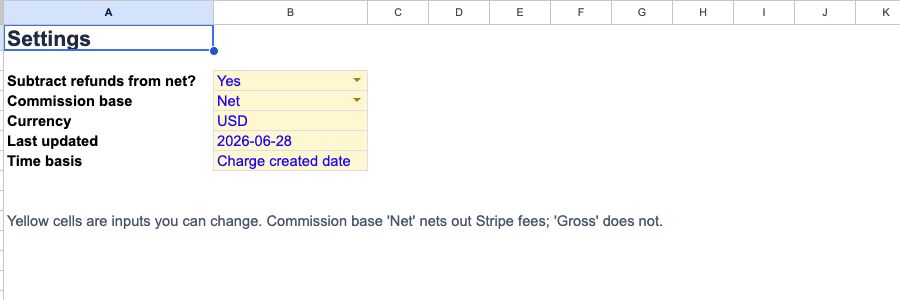
Choose whether to subtract refunds, and select Gross or Net as the commission base. Reports use the charge-created month.
The pieces you need to calculate a payout.
Owners and rates
Add reps or partners in Owners & Rates, then assign customers in Customer to Owner. Each owner has a percentage rate.
A defined commission base
Choose Gross or Net in Settings. Net deducts Stripe fees; a separate setting controls whether refunds are deducted.
Calculations you can inspect
Commission Calc shows the charge, owner, base, rate, and commission. Payout Summary groups the results by owner and month.
Get the free workbook
A starting point for your next commission report.
Receive the Google Sheets template by email, make your own copy, and adapt it to your agreements.
- Sample data and a CSV Import mapping workflow
- Editable owner rates and customer assignments
- Gross/net settings and optional refund deductions
- Charge-level calculations and monthly summaries
The template is free. SyncStaq is optional and has separate pricing.
A worked example
See what a refund changes.
With a net base and refund deductions enabled, the template calculates: amount collected minus Stripe fee minus refunded amount, then multiplies the result by the owner's rate.
| Example customer | Collected | Refunded | Stripe fee | Base | Rate | Commission |
|---|---|---|---|---|---|---|
| Demo Growth Co | $99.00 | $0.00 | $3.20 | $95.80 | 20% | $19.16 |
| Demo Refund Co | $49.00 | $20.00 | $1.72 | $27.28 | 15% | $4.09 |
Your agreement defines the commissionable base. Do not deduct discounts again if they are already reflected in the collected amount. Review taxes, disputes, currency, rounding, and post-payout adjustments separately; this template is not a full commission-management or accounting system.
Start with an export. Keep the rules yours.
1)
Bring in Stripe data
Use an export that includes fee detail. Paste it into CSV Import, match the expected columns, then paste the mapped values into Charges.
2)
Set your base and ownership
Choose your settings, enter owner rates, and map each customer to an owner. Check unassigned customers before approving a report.
3)
Review, then arrange payment
Inspect Commission Calc and filter Payout Summary by month. The workbook calculates amounts; it does not send money to reps or partners.
Rates use the owner lookup. Effective-date and refund-policy labels are not automatic rules in the current formulas; adapt the calculation if your agreement requires them.
Optional: stop repeating CSV exports
The template does the math.
SyncStaq keeps the source data moving.
SyncStaq keeps Stripe billing data available in Google Sheets for reporting, reconciliation, and analysis. Updates run hourly, with six months of history included in the first sync.
Use that data with your commission workflow. You still own the customer mapping, rates, formulas, and payout decisions.
Use the free template first.
No subscription is needed for the manual CSV workflow. When recurring exports become the bottleneck, connect Stripe to Google Sheets with read-only access through SyncStaq.
Start a 14-day free trialTemplate questions, answered.
Is the commission tracker really free?
Yes. You can use the Google Sheets template with manually imported Stripe exports without a SyncStaq subscription. SyncStaq is an optional paid service for keeping Stripe source data updated in Sheets.
Does the free template connect to Stripe automatically?
No. The free workflow uses CSV Import and a values-only paste into Charges. The workbook's calculations use the data you provide; a manual report is only as current as your last import.
Can I calculate both rep commissions and partner revenue share?
Yes. Owners & Rates includes reps and partners, and Customer to Owner assigns customers to them. The calculation applies the assigned owner's percentage to the selected base.
Does net always mean the same thing?
No. In this workbook, Net deducts Stripe fees, and you can separately enable refund deductions. Your agreement may define a different base, so review the formulas before using the results.
Will it handle retroactive refunds and clawbacks?
Updated refund amounts can change the calculated commission when the source data is refreshed. The workbook does not automatically track what you already paid or implement a separate clawback ledger; decide and record those adjustments in your own workflow.
Which Stripe CSV should I use?
Use an export with fee detail, such as an itemized balance or payout reconciliation report. A basic Payments CSV may not include fees. Match your exported columns to the CSV Import headers and verify amounts, refunds, units, and currency before calculating.
For the reporting workflow, read our Stripe partner revenue share guide or learn about reporting Stripe fees in Google Sheets.