
Stripe data. Your spreadsheet.
How SyncStaq works
Connect Stripe. Create your Google Sheet.
Keep billing data updated for the reports you build.
- Read-only Stripe access
- Six months of history
- Hourly updates
Three steps to your synced Sheet.
Connect your accounts. SyncStaq creates your Sheet and keeps Stripe data updated.
Connect Stripe
Sign in with Google, then authorize read-only access to your Stripe account. No custom API keys or scripts to maintain.
Create your Google Sheet
Grant Google Sheets access during setup. SyncStaq creates a dedicated Sheet in your Drive, with structured data tabs and a Working Sheet.
Backfill, then update hourly
The first sync brings in six months of Stripe billing history. After that, SyncStaq refreshes the connected data every hour.
The result
A Sheet you can actually work with.
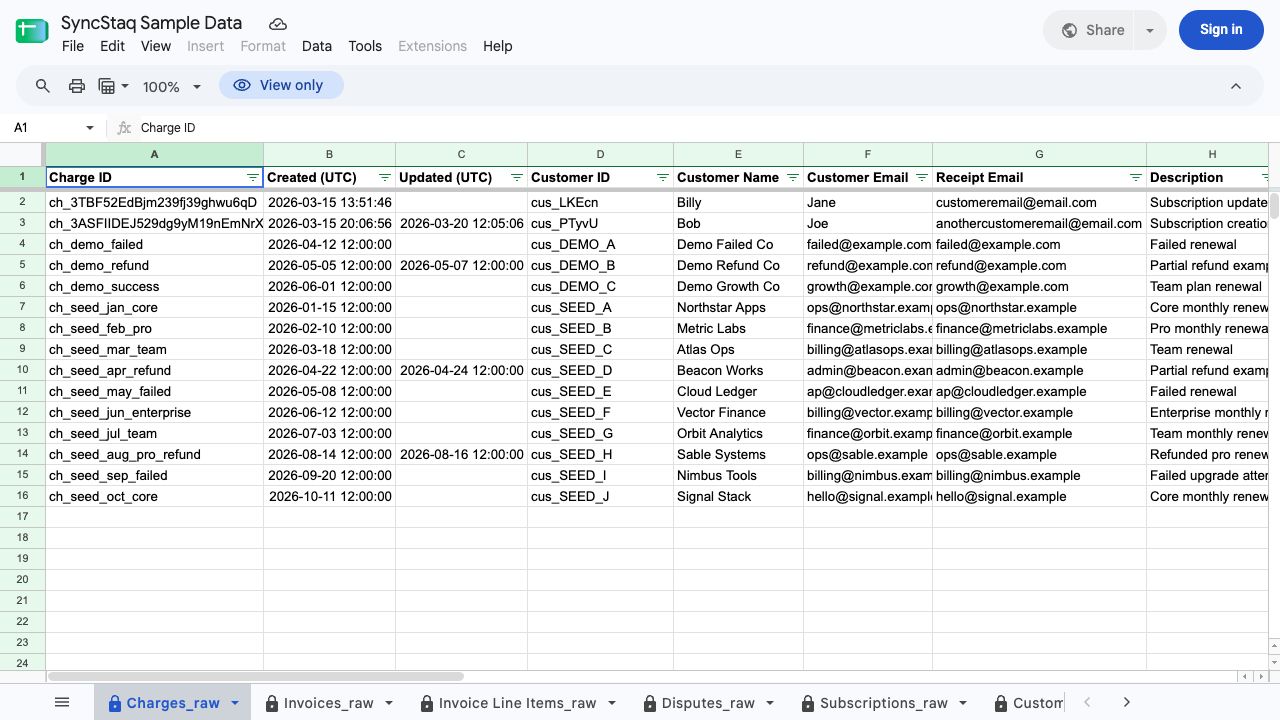
Stripe billing data is organized into separate tabs. Use the Working Sheet for your own formulas, pivots, labels, and reports.
Synced data
Protected data tabs contain the Stripe records SyncStaq maintains. Reference them in your formulas rather than editing the source rows.
Your Working Sheet
Your editable space for analysis. Build the report your team needs while keeping it separate from the synced source data.
| Data tab | Example fields | What you can investigate |
|---|---|---|
| Invoices & line items | Amounts, status, products, discounts, taxes | Billed revenue and product-level detail |
| Charges | Amounts, fees, refunds, payment status | Collected amounts, fees, and refunds |
| Customers | Customer ID, name, description | Customer billing context and labels |
| Subscriptions | Status, items, amounts, billing interval | Recurring billing and subscription changes |
| Payouts | Amount, currency, status, arrival date | Payout timing and reconciliation context |
| Disputes | Charge ID, amount, reason, status | Disputed payments and their current status |
After the sync
Keep the reporting workflow yours.
SyncStaq gets the billing data into Sheets. You decide how to group it, label it, and use it.
Report on revenue
Build formulas and pivots for customer, product, or subscription analysis. Define whether your report uses billed, collected, or net amounts.
Reporting revenue by productReview fees and payouts
Work with charge, fee, refund, and payout context without assembling a fresh set of CSV exports each week.
Payout reconciliation in SheetsCalculate commissions
Add ownership and rates to your spreadsheet workflow. Your formulas and agreements define the commission calculation.
Commission and revenue share templateA CSV export is useful for a one-off analysis. SyncStaq is for recurring work where you need the Stripe source data refreshed without another export or a custom script. Learn more about connecting Stripe to Google Sheets.
Clear boundaries. No surprises.
Read-only in Stripe
SyncStaq does not create or change Stripe records, process payments, issue refunds, or cancel subscriptions.
A dedicated Google Sheet
The connection uses a Sheet created through SyncStaq, not an arbitrary existing spreadsheet you select.
Your analysis and decisions
You own formulas, labels, reporting definitions, and review. SyncStaq does not replace your accounting system or professional advice.
Before you connect.
How often does the Sheet update?
The connected data updates hourly. The first sync includes six months of Stripe billing history. SyncStaq is not a real-time stream.
Can I use my existing spreadsheet?
Setup creates a dedicated Google Sheet through SyncStaq. Build your formulas and reports in its Working Sheet, using the synced data as the source.
Can I edit the synced data?
The source data tabs are protected. Use the Working Sheet to add formulas, labels, pivots, and reports without editing the synced source rows.
What happens when a Stripe record changes later?
SyncStaq uses Stripe events together with object retrieval to support updates to billing records after they were created. Your reporting workflow can use the refreshed source data rather than relying only on a one-time export.
Does SyncStaq calculate reports or commissions for me?
SyncStaq supplies the Stripe data. You build the reports and calculations in Sheets, using your definitions, formulas, and ownership rules. The free commission template is one starting point.
Where can I inspect the data before signing up?
Open the Sample Sheet page to explore the public example. It shows the structure and example fields without connecting your Stripe account.
Start with the data. Build your own report.
Inspect the Sample Sheet first, or connect your accounts and start a 14-day free trial.