
Free reporting template
Stripe Customer Revenue Google Sheets Template
Rank customers by billed revenue, then explore monthly totals and invoices. Copy the reporting tab into your SyncStaq Sheet to use your data.
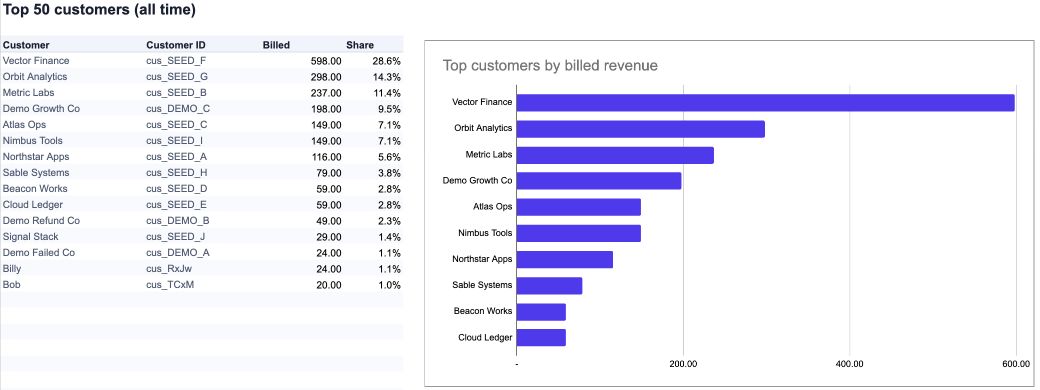
Reporting basis: Billed revenue is finalized invoice subtotal less discounts. It is not cash collected or revenue recognized.
Use it with your SyncStaq Sheet
Copy the template
Open the workbook and choose Make a copy.
Add the reporting tab
Right-click Working Sheet, then choose Copy to > Existing spreadsheet. Select your dedicated SyncStaq Sheet and rename the new tab Customer Revenue.
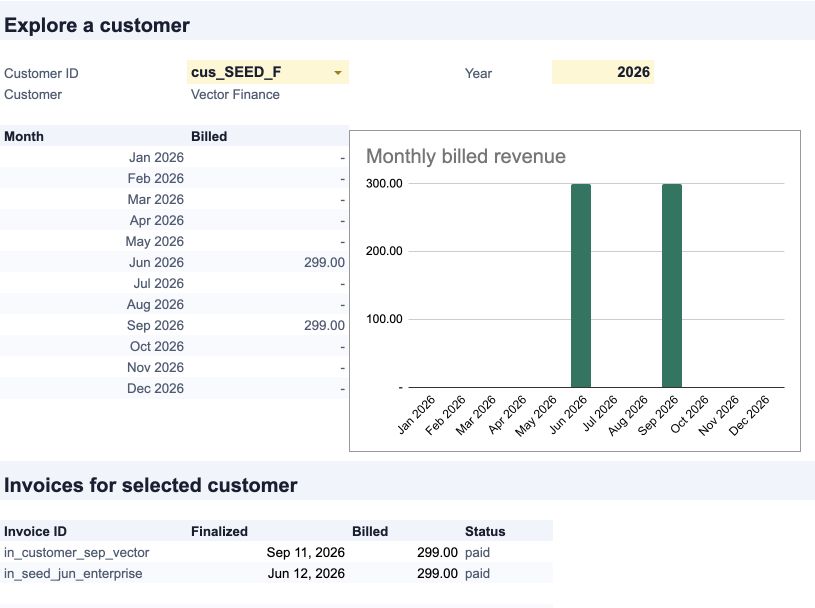
Explore a customer
Choose a customer ID in the yellow cell. The monthly chart and invoice list update for that customer; change the year to explore another period.
Template questions
Does copying the template connect it to Stripe?
No. The workbook opens with example data. Copy its Working Sheet tab into your SyncStaq-created spreadsheet to use your synced invoices.
Does billed revenue mean collected revenue?
No. The report includes paid, open, and uncollectible finalized invoices. It excludes draft and void invoices. It does not subtract refunds, fees, or credits.
Why does the report use customer IDs?
Customer names can change or be shared. The report groups invoices by Stripe customer ID and displays the current customer name alongside it.
Related guides
Keep your Stripe data in Sheets
SyncStaq creates a dedicated Google Sheet and keeps your Stripe billing data updated for reporting and reconciliation.
Start 14-day free trial