
Stripe to Google Sheets: CSV, Apps Script, Zapier, or Sync?
Sep 28, 2026 · Matt
If you've landed here, you've already decided where you want your Stripe data — in Google Sheets, where you can pivot it, chart it, and answer questions without learning a BI tool. The open question is how to get it there and keep it there.
There are four common approaches, and they're genuinely different. The right one depends on how often you need the data, how complete it has to be, and how much ongoing maintenance you're willing to own. Here's an honest comparison.
The four methods at a glance
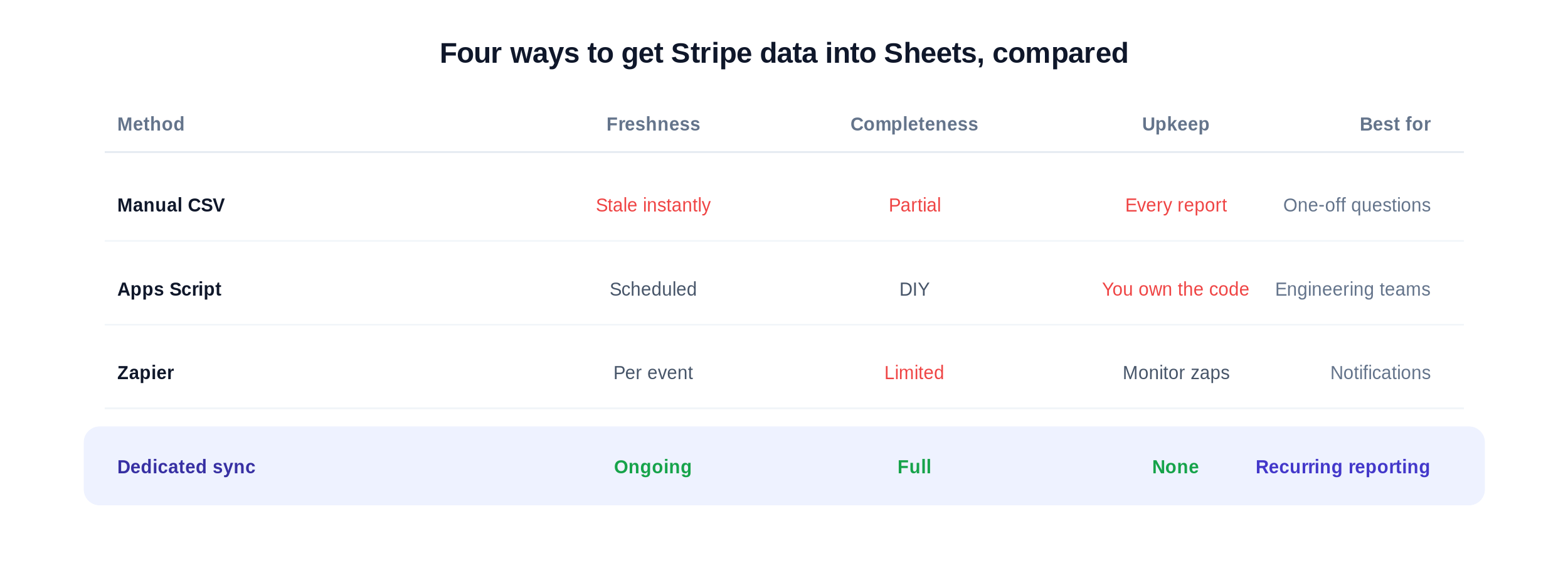
Four ways to get Stripe data into Sheets, compared on freshness, completeness, and upkeep.
1. Manual CSV export
The default. Open Stripe, go to Reports or Payments, export a CSV, paste it into Sheets. It's free and requires zero setup.
It also stops scaling almost immediately. The export is stale the second it lands, you re-do the whole dance every time you need fresh numbers, and joining multiple exports (charges + invoices + refunds) by hand is where errors creep in. The deepest trap: exports filtered by creation date can miss records that changed after they were created — a refund or dispute that posted later simply isn't there. Fine for a one-off question; painful as a routine. (We wrote up the full process in How to Export Stripe Data from Stripe.)
Use it when: you need a single number once and won't need it again next month.
2. Google Apps Script
If you have engineering time, you can write an Apps Script that calls the Stripe API and writes rows into a sheet on a schedule. Done well, it's powerful and fully customizable.
The cost is ownership. You're now maintaining code against Stripe's API: handling pagination, rate limits, auth, schema changes, and the subtle data-modeling problems (line items, proration, refunds posted after creation) that make Stripe reporting hard in the first place. It works until the person who wrote it is on vacation and a sync breaks at month-end.
Use it when: you have engineers, unusual requirements, and want total control.
3. Zapier and event-based automation
Tools like Zapier can append a row to a sheet when a Stripe event fires — a new charge, a new customer. For lightweight notification-style workflows, that's handy.
But event automations are built for triggers, not reporting. They typically capture new events going forward (no historical backfill), they don't reconcile records that change later, and reconstructing a complete, normalized dataset — invoices with line items, fees, and net amounts — from a stream of individual events is awkward at best. You often end up with a partial log rather than a queryable dataset.
Use it when: you want a notification or a running log, not a reporting-grade table.
4. A dedicated Stripe → Sheets sync
A purpose-built sync connects Stripe to a structured Google Sheet and keeps it current in the background — backfilling history on the first run and refreshing on an ongoing schedule. Because it's built specifically for this, it handles the parts that break the other methods: complete objects (invoices, subscriptions, customers, transactions, line items), fees and net amounts alongside gross, and updates to records that change after creation.
The trade-off is that it's a focused tool for a focused job: getting Stripe billing data into Sheets and keeping it accurate. If that's the job you have, there's very little to maintain.
Use it when: you report on Stripe data regularly and need it complete and current without babysitting it.
How to choose
Be honest about two things: how often you need the data fresh, and how complete it has to be.
One-off question? Manual CSV is fine. Don't overbuild.
Recurring reports, engineering to spare, unusual needs? Apps Script gives you control at the cost of maintenance.
Just want event notifications? Zapier does that well.
Recurring, reporting-grade analysis — MRR, churn, reconciliation, commissions? A dedicated sync removes the recurring export-and-reconcile work entirely.
Most teams start at method 1, feel the pain by the third or fourth monthly report, and graduate to a sync precisely because the manual version stopped being free once you count the hours.
SyncStaq is the dedicated-sync option: it keeps Stripe invoices and line items, charges, customers, payouts, subscriptions, and disputes mirrored into a structured Google Sheet, backfilling six months on the first sync and refreshing hourly after that. Read-only Stripe access, no scripts. See what the synced sheet looks like, explore how the integration works, or start a 14-day free trial.
Related reading: How to Export Stripe Data to Google Sheets Automatically and the Stripe CSV export alternative.